“Six pallets, Dallas to Houston, next week.” You can start a conversation from that email, but you cannot yet tell which carrier rate applies or what services the customer needs.
A trucking RFQ checklist collects the shipment details your desk needs before looking up rates: exact locations, dates, equipment, cargo measurements and site requirements. It also separates confirmed facts from information you still need to request.
Use the checklist below for US and Canada trucking requests, including FTL, LTL and partial loads. You will see how to turn an incomplete email into a usable load record, check density and floor space, and ask focused questions before preparing the customer offer.
Key Takeaways
Capture full pickup and delivery locations, site contacts and facility types before selecting a lane or zone.
Separate cargo-ready dates, operating hours and confirmed appointments from preferred delivery targets.
Record packaged dimensions, gross weight, handling-unit count, units of measurement and loading restrictions.
Use density and linear-feet calculations as checks, then confirm classification and carrier-specific rules separately.
Keep unknown details visible and obtain confirmation before sending a price that depends on them.
What Should a Trucking RFQ Include?
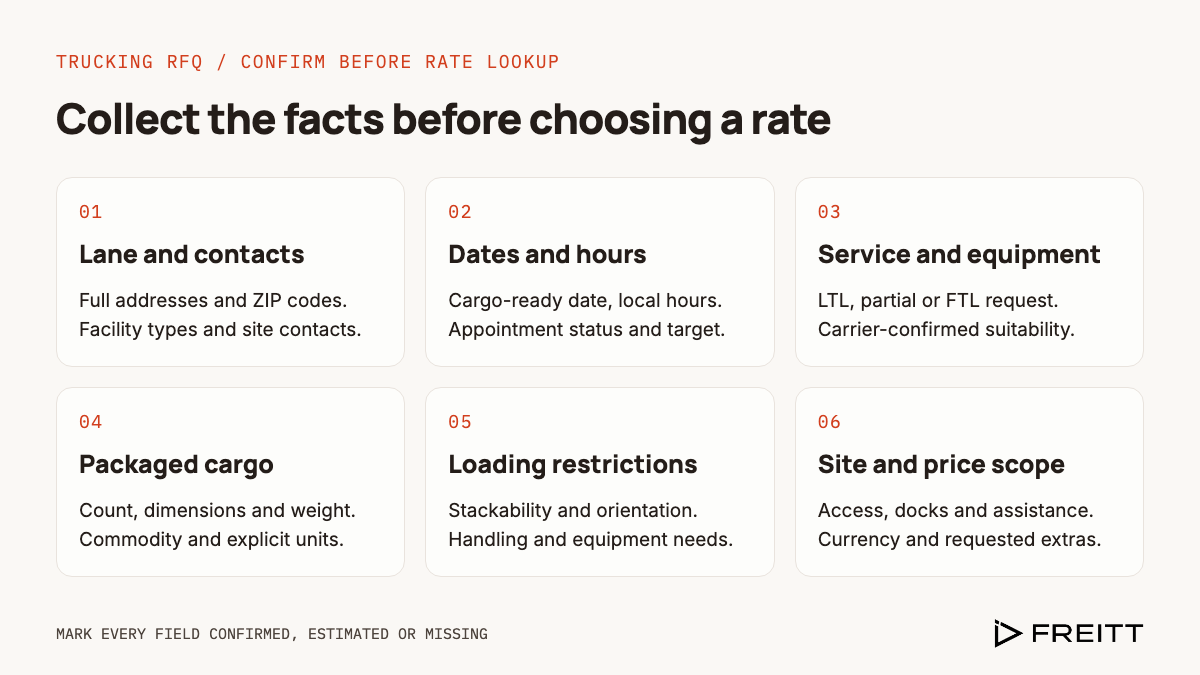
A trucking RFQ should describe what must move, between which facilities, when it is available and how each site can handle it. Add the commercial scope so every carrier is asked to price the same job.
This checklist covers individual loads. A procurement bid needs lane volumes and service measures too.
Use one load record with these fields:
Detail group | Information to capture |
|---|
Route | Complete addresses, postal or ZIP codes, countries and intermediate stops |
Timing | Cargo-ready date, local hours, appointment status and delivery requirement |
Service | LTL, partial or FTL request, equipment and special operating needs |
Cargo | Commodity, packaging, handling-unit count, packaged dimensions and gross weight |
Handling | Stackability, turning restrictions, loading equipment and driver-assist requirements |
Site access | Facility type, dock access, restrictions and named contacts |
Commercial scope | Currency, requested services, responsibility for extras and document readiness |
Tip: Add a status beside each field: confirmed, estimated or missing. An estimated weight should never look identical to a shipper-confirmed gross weight when another operator opens the record.
Confirm the Lane, Dates and Equipment First
Start with the details that determine which service and rate source your desk should consider. A matching city pair is not enough if the requested trailer cannot reach the receiver or meet its unloading arrangement.
Step 1: Identify Every Pickup and Delivery Site
Collect the full street address, city, state or province, country and ZIP or postal code for each stop. Record the facility type and the receiving or shipping contact separately from the customer's billing address.
Ask about additional stops, gate instructions and access restrictions. If the customer supplies only a city for an early budget request, label that limitation and confirm what must be checked before a firm offer.
Step 2: Separate Readiness from Appointments
Record when the freight will be packed and available, the site's operating hours and any appointment already accepted. Use dates and local time zones instead of “tomorrow morning” or “end of day.”
A preferred delivery date is different from a booked appointment. Ask whether timing is flexible, who books the slot and whether a specific service commitment is required. Leave unconfirmed appointments marked unconfirmed.
Step 3: Confirm the Requested Service and Equipment
Identify whether the customer wants LTL, partial or dedicated truckload service. Record dry van, refrigerated, flatbed or other equipment requirements, and ask the carrier to confirm suitability when the customer is unsure.
For temperature-controlled freight, capture the customer's written operating requirements. For unusual machinery or open-deck cargo, request drawings or photographs and loading details rather than inferring equipment from a short commodity name.
FMCSA's cargo securement rules cover securement requirements for US interstate commercial transport. Route, equipment and securement suitability still need carrier review; this intake checklist does not approve a loading plan.
Measure the Cargo and Check Both Sites
Measure the shipment as it will travel, then confirm how it gets onto and off the vehicle. Product specifications alone may omit the pallet, crate, packaging or protruding parts.
Step 4: Record Each Packaged Handling Unit
Capture the commodity, packaging type, quantity and outside length, width and height for each size group. Record gross weight, including the packaging and pallet, and specify inches versus centimeters and pounds versus kilograms.
State whether a weight applies to one unit, a row of identical units or the whole shipment. Ask about overhang, irregular shapes, hazardous materials and special handling. Request the relevant shipment documentation when a specialist review is needed.
NMFTA's bill of lading guidance identifies descriptions, counts, dimensions, weight, packaging and applicable classification information as shipment-document details. Carry the confirmed RFQ data through to later documents and investigate any differences.
Use Freitt's free LTL Density Calculator to check packaged weight against cubic volume. Its class result is an estimate: confirm the applicable NMFC item and classification requirements before placing a class on the shipment record.
Step 5: Confirm Stackability and Loading Orientation
Ask whether another unit may be placed on top and whether the freight may be turned. Do not treat “palletized” as confirmation of either condition.
Use the free Linear Feet Calculator to estimate trailer floor usage with the relevant dimensions, usable width and loading settings. Check its turning and stacking assumptions against the customer's instructions; the estimate does not establish a carrier's space-based rating rule.
Step 6: Verify Loading, Unloading and Access
Confirm dock availability and the equipment at both ends. Ask who supplies the forklift or crane, whether a liftgate is requested, and whether the driver must assist.
Also capture restricted approaches, vehicle-size limits, residential or jobsite delivery, required appointments and receiving contacts. Do not assume an accessorial is unnecessary simply because the address belongs to a business.
Further reading: Use the LTL accessorial checklist for a closer review of delivery-site requirements before rating.
Worked Example: Turn an Incomplete Email into a Usable RFQ
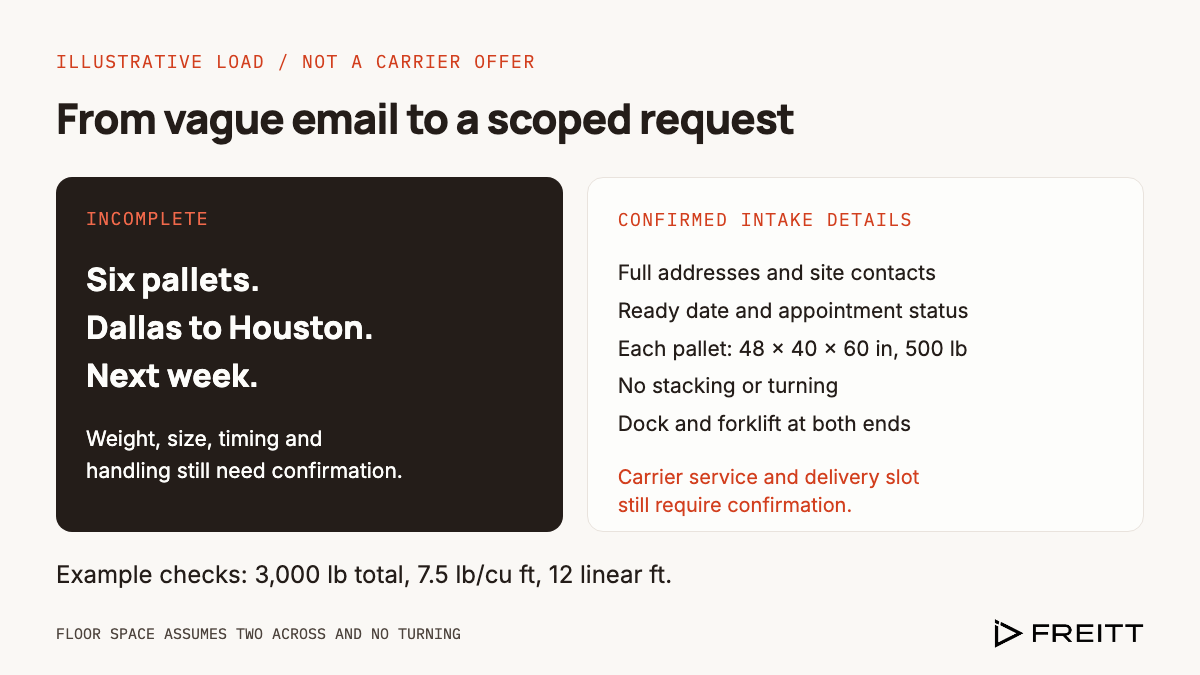
This fictional example shows an intake check, not a customer shipment or a carrier offer. The initial message says: “Please quote six pallets, Dallas to Houston, next week. Standard truck should work.”
Your desk requests the missing details and records the following answers:
Field | Initial email | Confirmed intake details |
|---|
Locations | Two cities | Full warehouse addresses and ZIP codes supplied in the private load record |
Timing | Next week | Ready November 24, 2026; pickup 09:00 to 14:00 Central; delivery target November 25, slot unconfirmed |
Cargo | Six pallets | Six identical pallets of packaged metal housings, each 48 × 40 × 60 inches and 500 lb gross |
Handling | Standard truck | No stacking or turning; dock and forklift at each site; no driver assist requested |
Service | Unspecified | Request options; carrier to confirm equipment, service and any classification needed |
The answers let you request options on a stated scope. You still need the carrier's service confirmation and the receiver's appointment details before promising a delivery commitment.
Step 1: Check the Total Weight and Density
Six pallets at 500 lb each give a total gross weight of 3,000 lb. One pallet occupies 48 × 40 × 60 ÷ 1,728 = 66.67 cubic feet, rounded to two decimals.
Using the unrounded volume, the shipment occupies 400 cubic feet. Density is 3,000 ÷ 400 = 7.5 lb per cubic foot. Density alone does not settle the freight class or rate.
Step 2: Check the Floor-Space Assumptions
Assume 96 inches of usable width for this illustrative calculation, with 40 inches across the trailer and 48 inches along it. Two pallets occupy 80 inches across, so six pallets require three rows.
Three rows at 48 inches use 144 inches, or 12 linear feet. This simple estimate assumes no additional gaps or securing space and needs carrier confirmation.
If turning were allowed, a different arrangement could produce a different result. In this example it is prohibited, so leave turning disabled when using the calculator. Do not change the customer's restriction to obtain a smaller floor-space figure.
Note: The useful outcome is a traceable RFQ with visible open items. It is not proof that standard LTL, partial or FTL is available or cheapest for this load.
How Should You Handle Missing or Conflicting Details?
Handle missing information with a focused clarification request and an assigned owner. Preserve conflicting source documents until the customer confirms which information governs the request.
For example, an email may say six pallets while its attachment lists seven. Ask for the final packed count and corrected measurements together, rather than choosing the email because it arrived last.
A useful clarification message could read:
“Before we price this load, please confirm the final pallet count, packaged dimensions and gross weight per pallet. Please also confirm pickup readiness, receiving hours, whether an appointment is booked, and dock or unloading equipment at both sites. Your email lists six pallets and the attachment lists seven; which count should we use?”
Give each unanswered question a status and owner. Request related facts together, then check that the response resolves the actual uncertainty rather than merely acknowledging the message.
Freitt's email-to-quote workflow reads forwarded RFQs and attachments, structures shipment details and raises missing or ambiguous information. Clarification responses remain drafts for your team to review and send.
Use these decision points before rate lookup:
Proceed when the inputs needed for the selected rate basis and requested service are confirmed.
Request clarification when a missing fact could change equipment, rating or site access.
Escalate conflicting specifications or specialist requirements for review.
Label any permitted budget estimate with its specific assumptions and confirmation conditions.
Review the Commercial Scope Before Sending
Review the quote against the confirmed load record, not only the carrier's price line. Check currency, fuel treatment, requested accessorials, waiting-time conditions and validity against the applicable source.
For a US and Canada cross-border request, identify the customs broker, document owner and which services are included in your offer. CBSA's invoice requirements memorandum addresses commercial goods imported into Canada and currently flags content under review following the CARM transition. Coordinate current documentation requirements with the responsible broker.
Before sending, confirm that:
The quote uses the latest confirmed cargo, locations and timing.
Equipment and access requirements match the service being offered.
Classification or specialist questions have been resolved where needed.
Included services, exclusions, currency and validity are explicit.
Open appointments or conditional commitments are stated accurately.
Changed shipment details will trigger a review before booking.
Keep the accepted scope and its source documents together. If the customer later changes the weight, pallet count, delivery location or unloading requirement, recheck the offer rather than assuming the original price still applies.
FAQs
What information do you need for a trucking quote?
You need pickup and delivery locations, dates, service requirements, cargo details and handling arrangements to prepare a useful trucking quote. Capture packaged dimensions, gross weight and handling-unit count with explicit units. Then add site restrictions, appointments and requested accessorials so the carrier can evaluate the actual move rather than a city pair alone.
Do you need exact dimensions for a truckload RFQ?
You should provide packaged dimensions for a truckload RFQ, particularly when cargo fit, loading orientation or special equipment is uncertain. Total weight alone does not describe an unusually long, tall or wide piece. Ask the carrier which measurements and supporting documents it needs, and confirm the final packed dimensions before treating equipment suitability as settled.
Should pallet weight and packaging be included?
Include the pallet and packaging in the shipment's gross weight and outside measurements. Record what each weight represents so per-pallet figures are not mistaken for shipment totals. If the customer has only an estimated figure, label it clearly and request a confirmed packed weight before relying on a rate that depends on it.
Can a density calculator determine the final freight class?
A density calculator provides a calculation and may suggest a class, but it does not confirm every classification requirement. The commodity's applicable NMFC item and other characteristics still need review. Keep the measured dimensions and weight alongside any estimate, and resolve classification questions before putting an unsupported class on the load record or bill of lading.
Why can two loads with six pallets use different linear feet?
Two six-pallet loads can occupy different floor lengths because dimensions, usable trailer width, orientation and stacking permissions differ. Additional handling or securing space can also change the practical arrangement. Enter the actual restrictions into your calculation and have the carrier confirm the loading assumptions instead of assigning a fixed floor-space value to every pallet count.
Is a complete trucking RFQ the same as a booking?
A complete trucking RFQ is a request for pricing and service evaluation, not a confirmed booking. You still need the accepted rate, agreed scope, carrier capacity and required appointment arrangements. Keep those stages distinct in customer communication, and recheck the quote if the load details change before the transport is confirmed.
Build a Quote from Confirmed Load Details
Start with one incoming request and work through the checklist before selecting a rate. Measure the packed freight, confirm both sites and keep unresolved questions visible until the right person answers them.
Bring that RFQ and your approved rate sheet to see how Freitt prepares a reviewable quote draft. Your team checks and sends the customer response.