A request says "four pallets, 480 pounds." The attachment lists dimensions, but nobody can tell whether the weight applies to each pallet or the whole shipment. You have a number in the weight field, yet you do not have a reliable rating input.
LTL quote data validation checks whether shipment details are usable, consistent and confirmed for the service being quoted. It should identify the exact question that needs an answer while leaving complete requests available for pricing and review.
This guide provides a field-validation template, a focused clarification workflow and a worked weight example. Use it to move from "we captured the email" to a shipment record your pricing team can trust.
Key Takeaways
A populated field still needs checks for units, meaning and consistency.
Keep the original value and source alongside any confirmed correction.
Distinguish missing, conflicting and service-dependent information when assigning follow-up.
Ask specific clarification questions under the original request reference.
Revalidate affected facts and pricing when a reply changes the shipment record.
Separate Captured Data from Confirmed Rating Inputs
Captured data is what the customer supplied or your intake process extracted. Confirmed rating inputs are the facts that have passed your checks for the intended service and applicable rate basis.
Give each important field a status with a clear meaning:
Missing: no usable value was supplied.
Needs confirmation: a value exists, but its meaning or accuracy is unresolved.
Checked: the value passes the defined checks for the current request version.
Not applicable: the field is unnecessary for this service, with a recorded reason.
Do not use "checked" to imply a physical inspection that never happened. Record the evidence and the level of confirmation your team actually obtained.
Requirements depend on the service. The FedEx Freight shipment guide identifies addresses, classification, total weight, ready date and special handling among the information needed to create a shipment. Your desk should translate the requirements of its own services and agreements into field checks.
For example, a numeric weight may pass a format check but fail a meaning check because "per pallet" is unspecified. An empty liftgate field means unknown unless your intake process has established what an empty answer represents.
Tip: Keep a short explanation beside each held field. "Weight basis unclear" is more useful than "bad data."
Build a Field-Validation Template Your Team Can Apply
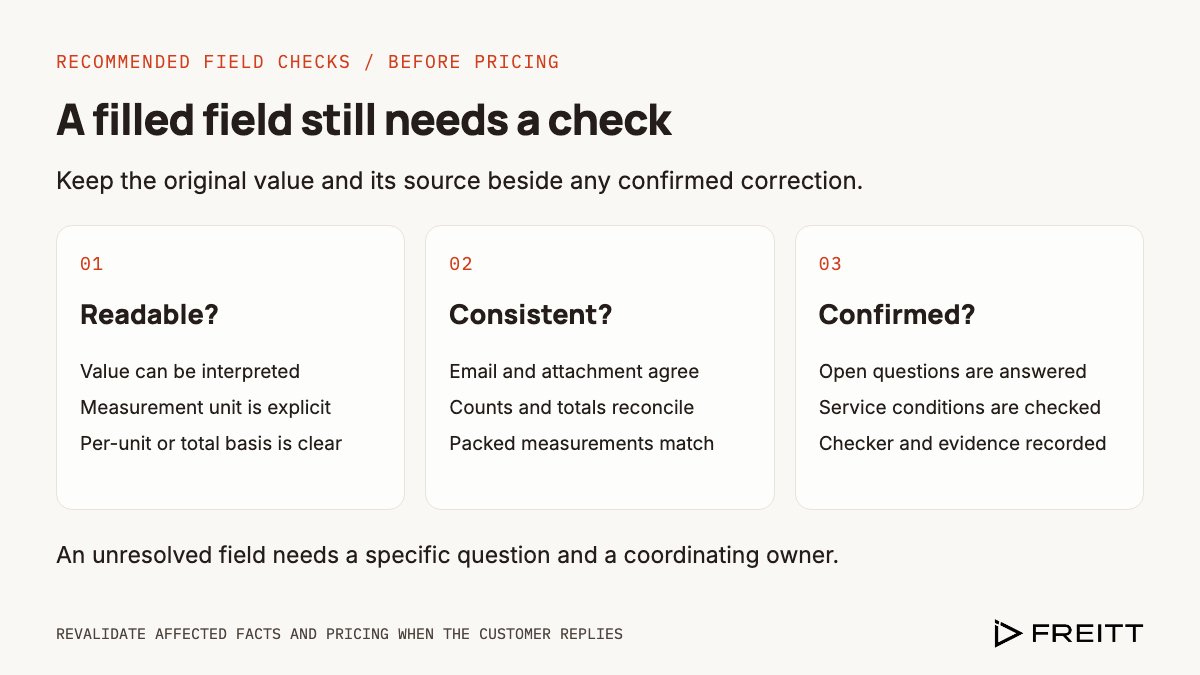
Define checks at the field level so different coordinators reach the same next action. Start with the failure patterns your desk sees, then document what evidence clears each one.
Field group | Check | Clarification or review action |
|---|
Locations | Country, postal code and location facts fit together | Confirm the conflicting location detail |
Handling units | Count and packaging type describe what is tendered | Ask what the count includes |
Weight | Unit and per-unit or total basis are explicit | Confirm the basis and packed weight |
Dimensions | Packed measurements and units cover the handling units | Request missing measurements or projections |
Commodity and class | Description and classification information are usable | Route uncertainty to a qualified reviewer |
Service requirements | Access, timing and special handling are confirmed | Ask about the unresolved service condition |
Choose required and conditional fields deliberately. For example, a specific service or commodity may require additional information beyond your standard form. Your validation template should identify the condition that triggers the extra question.
For measurements, NMFTA's density guidance describes freight in its condition as tendered, including packaging and pallet configuration. Record the packed handling unit, rather than substituting product-only measurements when those do not represent the shipment.
Preserve source references when values disagree. If the email and attachment contain different weights, record both and ask which represents the shipment being quoted. Do not assume the attachment is newer or more authoritative simply because it looks formal.
Note: These are operating checks for your desk, not a promise that a particular software product provides every validator automatically.
Send a Clarification the Customer Can Answer
A useful clarification names the unresolved detail, states the options where appropriate and explains what confirmation is needed. Keep it under the existing request reference so the reply returns to the right work item.
Step 1: Collect the Open Questions
Review the request before writing. Combine related questions into one concise message, while keeping special-service or classification decisions with the responsible reviewer. Avoid sending the customer a generic form that asks again for facts already supplied clearly.
Step 2: Ask About the Exact Ambiguity
Use a focused message such as this fictional example:
"For request R218, please confirm whether 480 lb is the combined packed weight of all four pallets or the packed weight of each pallet. Please also confirm that the stated dimensions include the pallets and packaging."
That question gives the sender a direct choice and identifies the physical measurement required. It does not suggest which answer would produce a preferred rate.
Step 3: Assign the Follow-Up
Record one coordinator, the question sent, the reply reference and the next check time. If another team member covers the request, they should see what was asked before contacting the customer again.
Keep drafts distinct from sent messages. A prepared clarification does not mean the customer has been contacted, and a reply notification does not mean the record has been checked.
Tip: Ask for units with the value. "Please confirm the weight" can produce another answer that is still unusable.
Worked Example: Resolve Per-Pallet and Total Weight
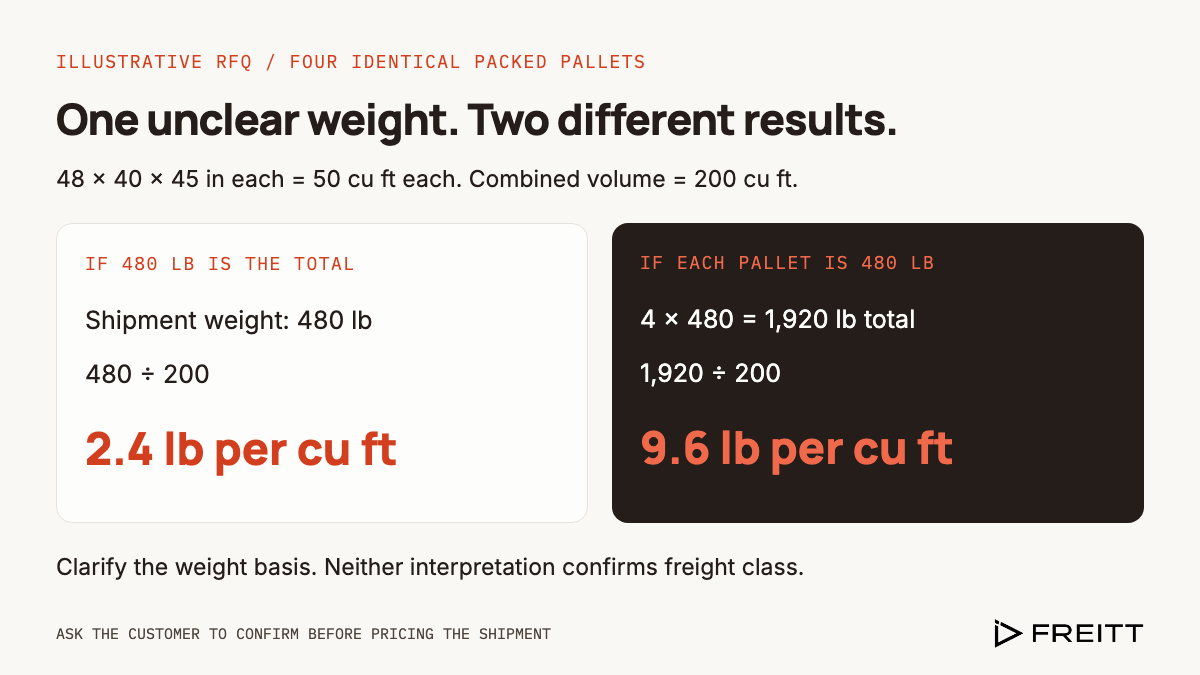
Example: A fictional RFQ describes four identical pallets, each measuring 48 × 40 × 45 inches, and gives a weight of 480 lb without stating its basis. Assume the dimensions represent the full packed handling units.
First calculate the space described:
Each pallet: 48 × 40 × 45 = 86,400 cubic inches.
Each pallet volume: 86,400 ÷ 1,728 = 50 cubic feet.
Combined volume: 4 × 50 = 200 cubic feet.
Now consider the two possible weight meanings. These are alternative interpretations to clarify, not permission to choose one.
If 480 lb is the whole shipment, density is 480 ÷ 200 = 2.4 lb per cubic foot.
If each pallet weighs 480 lb, total weight is 4 × 480 = 1,920 lb and density is 1,920 ÷ 200 = 9.6 lb per cubic foot.
The ambiguity changes the weight and calculated density by a factor of four. Do not select a freight class or prepare a confident price from either interpretation before the customer confirms the facts.
After confirmation, the free LTL Density Calculator can help check the arithmetic. Its class estimate does not confirm the applicable NMFC item or final classification.
If the request also raises floor-space questions, use the Linear Feet Calculator as an estimate and confirm the carrier's loading and rating rules. Neither calculator can supply a missing customer measurement.
Note: All shipment figures in this example are illustrative. No customer result, carrier price or classification outcome is being claimed.
Revalidate the Record When the Answer Arrives
A reply clears a hold only after someone matches it to the correct request and checks what changed. Preserve the original value instead of replacing it without a record.
Use a clarification record with these fields:
Request reference and record version.
Field name, original value, unit and source reference.
Validation status and reason for the hold.
Question sent, coordinating owner and reply reference.
Confirmed value, checker and time checked.
Affected pricing or service checks to repeat.
In the fictional R218 example, the customer may confirm "480 lb per pallet, including packaging." Record that answer against the weight field, retain the earlier ambiguous value and calculate the combined weight from the confirmed basis.
Then check the consequences. A revised weight can affect the applicable rate band; revised dimensions can affect density or space questions; a changed delivery location can affect service requirements. The correction is not complete merely because one blank field is now filled.
If a quote draft already exists, mark it for review when a material input changes. Record which version of the shipment facts the reviewer used before sending. Your systems or work register should support this operating rule, even if the control is initially manual.
Tip: A reply that says "yes" may not resolve a message containing several questions. Confirm which statement the customer is approving.
Keep Clarification Work from Blocking Complete Requests
Hold the affected request, or the affected shipment within a multi-request file, while allowing independently complete work to continue. Keep the relationship to the original file so the desk can reconcile what remains outstanding.
Freitt's road freight quoting workflow prepares drafts from applicable approved road rates. It also reads forwarded RFQs and supported attachments, with missing or ambiguous shipment details raised for clarification.
Use that preparation alongside your field-validation record. Freitt prepares clarification drafts; a person reviews and sends customer messages and quotes. The field statuses, routing template and record-version process in this guide are recommended operating controls, not claims about native validation or queue features.
At handover, check that each incomplete request has:
A specific unresolved field and a clear question.
One coordinating owner and a recorded next action.
The original source and any customer reply.
A defined check before returning to pricing.
Further reading: The high-volume LTL quote desk guide explains the wider intake and exception-routing structure. Use this article's field checks inside that process rather than treating every captured email as ready to price.
FAQs
What is LTL quote data validation?
LTL quote data validation checks that shipment facts are readable, consistent and suitable for the service being priced. It goes beyond extracting a value from an email. Your desk also needs to confirm units, weight basis, packed measurements and any conditional service requirements before treating those values as reliable rating inputs.
What should you do when an LTL request is incomplete?
Hold the affected request and identify the exact field that needs confirmation. Assign a coordinator, ask a focused question under the original reference and record the next action. Keep other independently complete requests moving. Resume pricing only after the answer has been checked and any affected rate or service decisions have been reviewed.
Can you assume a standard pallet size when dimensions are missing?
Do not substitute a standard pallet size for the packed shipment measurements needed to rate the freight. The load may overhang or include packaging that changes its outside dimensions. Ask for measurements as tendered, with units. Confirm what the applicable service requires rather than using a convenient default as a customer-supplied fact.
How do you distinguish pallet weight from shipment weight?
Ask whether the supplied weight applies to each handling unit or the combined shipment. Record that basis explicitly, together with the unit and whether packaging is included. For mixed pallets, keep their individual facts or a clearly confirmed total. Do not multiply a shipment total by the pallet count accidentally.
Does a density calculation confirm freight class?
A density calculation does not by itself confirm the applicable freight class. It is a calculation from the confirmed packed volume and weight. Classification also depends on the applicable NMFC item and its provisions. Route uncertainty to a qualified reviewer, and avoid treating a calculator's estimate as a verified classification decision.
Should you recheck a quote after the customer changes a detail?
Recheck the parts of the quote affected by the changed fact before sending or reconfirming the offer. Weight, dimensions, locations, timing and service requirements can alter the price or scope. Preserve the earlier record, document the new confirmation and ensure the reviewer uses the current shipment version rather than an outdated draft.
Turn Missing Details into Clear Next Actions
Start with a short field-validation template and specific clarification questions. Keep the original evidence, record confirmed corrections and recheck the pricing decisions those corrections affect.
To discuss preparing human-reviewed LTL quote drafts from your approved rates with Freitt, Book a Demo.