A busy LTL quote desk can receive complete shipment requests, vague emails and revised spreadsheets within the same few minutes. If every request enters one undifferentiated inbox, your pricing team has to rediscover what is missing before deciding what to do next.
High volume LTL quote automation means turning incoming requests into structured, checked work, preparing drafts from approved rates and sending unresolved issues to a named owner. You still need a person to review and send the customer quote.
This guide gives you a practical intake design, an exception-routing worksheet and an illustrative peak-hour workload calculation. Use them to organize an LTL carrier's quote desk around the work each request needs next.
Key Takeaways
Separate ready-to-price requests from missing-information and rate-source exceptions.
Preserve the original email, shipment facts and rate evidence under one request reference.
Give every hold an owner, a next action and a condition for returning to pricing.
Plan capacity for clarification and review effort as well as draft preparation.
Pilot one defined queue before expanding automation across the desk.
Define What Makes an LTL Request Ready to Price
A request is ready to price when you have the shipment facts and applicable rate basis needed to prepare a defensible offer. A readable email alone does not meet that standard.
Define the required fields for your services and accounts before configuring intake. For a practical starting point, capture:
Customer account, contact and original request reference.
Origin and destination, including postal codes and location types.
Pickup date, readiness window and requested service.
Handling-unit count, packed dimensions, weight and measurement units.
Commodity description and applicable classification information.
Access requirements, special handling and requested accessorial services.
Carrier requirements matter. The FedEx Freight shipment guide identifies addresses, classification, total weight, ready date and special handling among the information needed to create a shipment. Build your own validation checklist around the services you actually sell.
Keep extracted values separate from confirmed corrections. If a spreadsheet says 900 pounds and the email says 900 kilograms, create a clarification task. Do not silently choose the value that produces a price.
For measurement checks, use the free LTL Density Calculator and Linear Feet Calculator. They help check density and estimated floor space; they do not confirm final classification, loading acceptance or carrier-specific rating rules.
NMFTA's classification guidance explains that classification considers density, handling, stowability and liability. Treat a density result as one input, and send unresolved classification questions to someone qualified to confirm the applicable item and class.
Tip: Ask for the exact missing field and its unit. A specific clarification gives the customer a usable next action.
Build Separate Queues for Ready Work and Held Requests
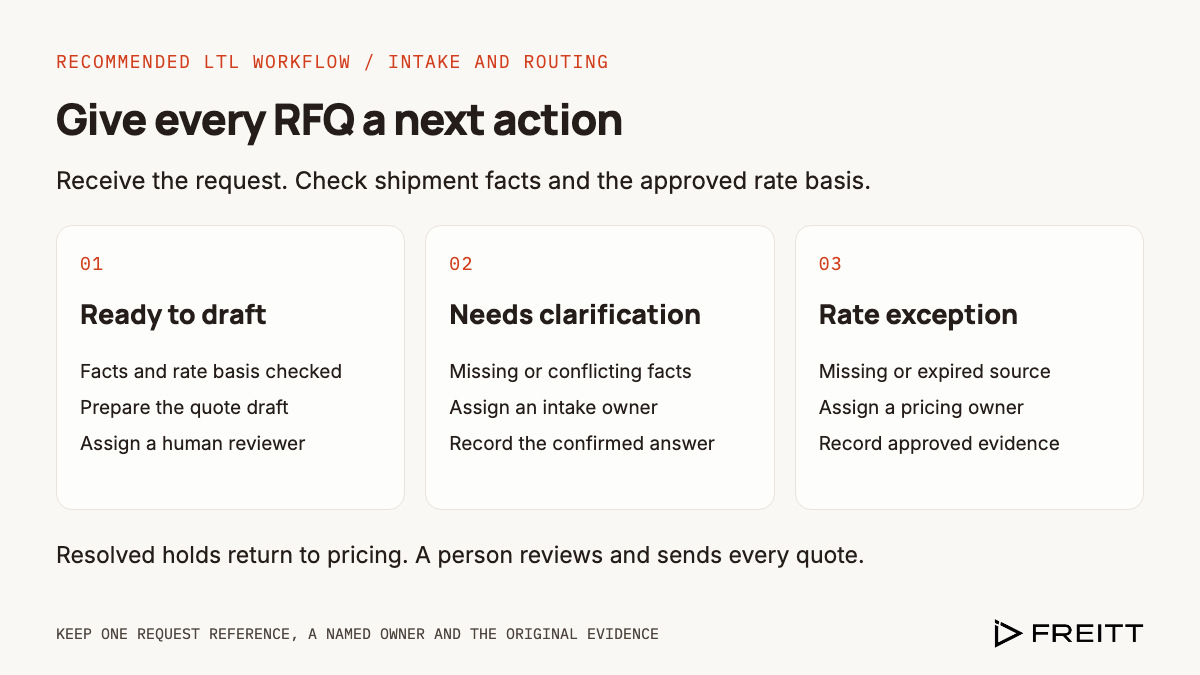
Separate queues let your team keep complete requests moving while other requests wait for information or pricing decisions. Define the stages first, then decide which parts your existing systems can support.
Use one request reference from intake through the sent offer. Preserve the original thread and attachments, then assign a status with a concrete meaning:
Received: captured, with intake checks still pending.
Needs clarification: a required shipment fact is missing or contradictory.
Rate exception: no valid, applicable approved price has been established.
Ready to draft: required facts and rate basis have passed checks.
Awaiting review: the draft needs a named reviewer.
Sent, closed or withdrawn: the record has a documented outcome.
These are recommended operating states, not a claim that every platform provides these exact queue controls. A shared work register can establish ownership before you implement deeper system connections.
For multi-line spreadsheets, give each shipment request a traceable line reference. Track the parent file separately so one incomplete lane does not conceal complete requests elsewhere in the batch. Confirm supported import behavior before assuming your software can process a bulk file directly.
Check for repeat submissions using the customer, reference, shipment facts and thread history. Route a suspected duplicate for confirmation; an identical lane can still represent a different shipment.
Note: Preserve the original arrival time when work changes queues. Otherwise, an old request can look new each time someone updates its status.
Route Exceptions with Clear Release Conditions
An exception needs more than a warning label. Give it a reason, a responsible owner, a next action and evidence that will clear the hold.
Use a simple routing worksheet like this one. The roles are examples; replace them with your desk's actual responsibilities.
Hold reason | Owner | Condition for returning to pricing |
|---|
Missing packed dimensions | Intake coordinator | Customer confirms dimensions and units |
Conflicting weight figures | Intake coordinator | Correct weight is confirmed and recorded |
Classification uncertainty | Classification specialist | Applicable classification is confirmed |
Expired or missing rate source | Pricing lead | Current authorized source is recorded |
Accessorial not priced | Pricing lead | Applicable charge and service scope are confirmed |
Commercial approval required | Authorized approver | Decision and permitted terms are recorded |
If a request has several holds, record all of them under the same reference. Name one coordinating owner so the customer does not receive competing clarification emails from several colleagues.
Set internal escalation rules around urgency and queue age. For example, a pickup deadline may require the coordinator to contact a backup owner sooner. Choose those targets from your own operating coverage; they are not carrier service guarantees.
Keep exception work visible while it waits externally. Record who was contacted, what was requested and when the desk should check again. A request awaiting customer dimensions should not repeatedly circulate through pricing as if another rate search will solve it.
Tip: The person clearing a hold should record the new evidence. A status change without an explanation leaves the next reviewer guessing.
Worked Example: Plan for a Burst of 120 RFQs
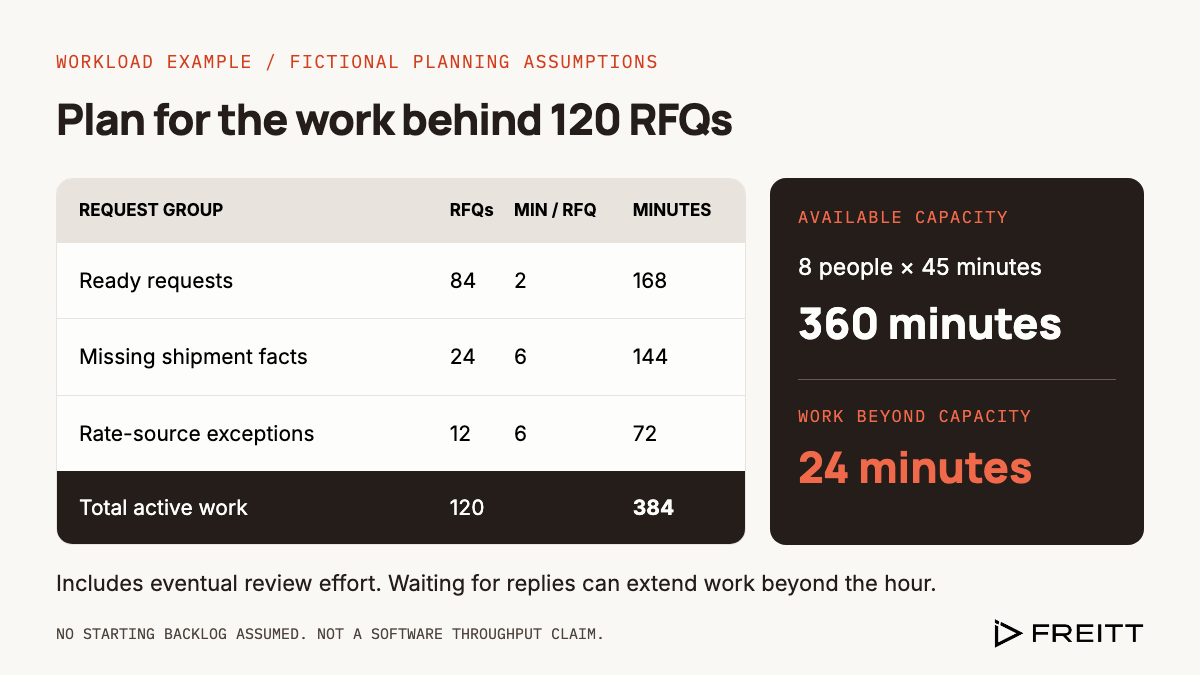
Example: An LTL desk receives 120 new requests during a peak hour. The following volumes and handling times are fictional planning assumptions, not measured customer results or a software throughput promise.
Assume intake identifies 84 complete requests, 24 with missing shipment facts and 12 with unresolved rate sources. Budget two minutes of active handling for each complete request and six minutes for each exception request, including its eventual review.
Request group | Requests | Active minutes each | Total active minutes |
|---|
Ready requests | 84 | 2 | 168 |
Missing shipment facts | 24 | 6 | 144 |
Rate-source exceptions | 12 | 6 | 72 |
Total | 120 | Varies | 384 |
The demand generated by that arrival burst is 384 staff-minutes, or 6.4 staff-hours. That effort may extend beyond the arrival hour because customers and pricing owners may reply later.
Now assume eight team members each have 45 productive minutes available in the hour after allowing for other duties. Their combined capacity is 8 × 45 = 360 minutes, leaving 24 minutes of active work beyond that capacity.
Under the same assumptions, nine people would offer 405 minutes. That arithmetic does not prove you need another hire: work allocation, reply timing, existing backlog and actual handling times still determine the plan.
Use the calculation to locate the constraint. Faster draft preparation may leave clarification ownership or final review overloaded. Measure those stages before predicting how much additional volume your desk can absorb.
Note: This example assumes no starting backlog. Add existing unfinished work before using the model for a real shift.
Connect Automated Draft Preparation to Human Review
Freitt's road freight quoting workflow uses the desk's applicable road rates, equipment rules, fuel and sheet-defined accessorials to prepare a draft. The product also reads forwarded RFQs and supported attachments, with missing details raised for clarification.
Use that preparation inside a documented review process. Your reviewer should be able to check the shipment facts, rate source, charge scope, validity and customer-facing terms before sending.
Freitt flags missing or expired rates rather than inventing them. A person reviews and sends every customer quote; clarification and follow-up messages are drafts too. Native Gmail and Outlook connections are coming soon, while inbox forwarding is available today.
Keep operational plans separate from product promises. Bulk ingestion, queue assignment rules, custom integrations and peak-load behavior need explicit verification for your proposed setup. The queue design and staffing example in this guide are recommendations, not claims about built-in functionality or tested capacity.
Further reading: Use the trucking RFQ checklist when defining the shipment fields your intake process must check.
Pilot One Queue Before Expanding Across the Desk
Start with a defined customer group or service scope whose approved rates and required inputs are clear. A limited pilot lets you find routing and review problems before more teams depend on the process.
Step 1: Establish the Baseline
Record actual arrival patterns, active handling time, review effort and clarification reasons. Include peak periods and difficult requests. Keep customer waiting time separate from staff effort so external delays do not distort your staffing calculation.
Step 2: Test the Hold and Release Rules
Run representative cases: a complete request, mixed units, a missing dimension, an expired rate, an unpriced accessorial and a duplicate submission. Confirm that each case reaches the correct owner and cannot advance without the required evidence.
Check that a changed customer reply triggers another review of affected facts and pricing. A previously approved draft should not remain approved automatically after a material shipment change.
Step 3: Expand Only After Reviewers Can Trust the Record
Agree on acceptance conditions before widening the pilot. Look for traceable source rates, correctly assigned holds, readable drafts and a documented human sending step.
Reconcile received requests against the work register.
Check waiting items for an owner and next action.
Sample cleared holds for supporting evidence.
Confirm backup coverage and a manual fallback.
If the intake process stalls, use the fallback to capture requests and preserve their arrival times. Once service resumes, reconcile references before reprocessing work. Expanding safely depends on control of unfinished work as much as the speed of draft creation.
FAQs
What is high volume LTL quote automation?
High volume LTL quote automation organizes incoming RFQs into structured, validated work and prepares drafts from approved pricing sources. The operating process also routes missing information and pricing exceptions to responsible people. Scale depends on the whole desk, including clarification, review and coverage, rather than a universal number of quotes per hour.
What information do you need to automate an LTL quote?
You need the shipment facts and rate basis required for the service you are quoting. Start with locations, pickup timing, handling units, packed dimensions, weight, commodity information and access requirements. Confirm classification and applicable charges. Keep unclear values on hold instead of turning an incomplete request into a confident-looking price.
Can an LTL quote be priced when dimensions are missing?
Hold the request when missing dimensions prevent a reliable rating or service decision. Ask the customer for packed measurements, including the handling unit, and confirm the units. Your applicable rate agreement determines the precise inputs needed. Do not use a convenient pallet-size assumption as a substitute for confirmed shipment facts.
How should you handle an expired or missing LTL rate?
Route the request to the person authorized to establish a current, applicable price. Record the missing source or expired validity date and keep the quote on hold until approved evidence is available. A historical price may help explain the issue, but it does not become an authorized current rate merely because the desk is busy.
How many RFQs can one quote desk handle?
A desk's capacity depends on arrival patterns, request completeness, active handling time and available reviewer coverage. Calculate the work generated by ready requests and exceptions separately, then add existing backlog. Use measured times from your own team. The worked example above demonstrates a planning method, not a benchmark for another operation.
Does automating intake mean quotes are sent automatically?
Automating intake does not require automatic customer sending. You can extract shipment details, check required fields and prepare drafts while keeping a person responsible for final review and sending. Define that control explicitly in your operating process, including who may approve exceptions and what happens when the assigned reviewer is unavailable.
Build a Quote Desk That Can Handle the Next Busy Period
Start with one intake standard, visible holds and clear ownership. Then check whether your rates, review capacity and exception coverage can support the demand arriving at the desk.
To discuss preparing human-reviewed LTL quote drafts from your approved rates with Freitt.