A carrier sends an updated workbook. Your team loads it, sees the expected number of rows and starts quoting. Later, someone discovers that a minimum charge disappeared during mapping or an old lane rate still matches the same customer account.
LTL rate sheet automation turns approved spreadsheet pricing into records your quote desk can use consistently. Before those records reach customer drafts, you need to check the meaning of each field, identify conflicting entries and prove that the calculation follows the applicable agreement.
This guide gives you a repeatable validation process, a fictional bulk-import error report and a worked LTL charge calculation. Use them to prepare large approved rate files for quoting without treating a successful upload as approval to use every row.
Key Takeaways
Preserve the original workbook and identify the agreement, account and version each import represents.
Map rate basis, units, currency, validity and minimums alongside the price.
Hold ambiguous or incomplete entries until a named pricing owner resolves them.
Reconcile every imported row to a clear validation outcome before releasing a version.
Test complete quote calculations and keep a controlled way to withdraw a faulty release.
Establish the Approved Source Before Mapping
Start with an authorized rate source whose scope and ownership you can identify. A spreadsheet attachment is not enough if nobody can explain which customer, service or agreement it covers.
Record the carrier or pricing owner, account scope, file name, version, effective dates and person responsible for approving its use. Preserve the original file unchanged. Keep your mapped or cleaned working copy separately so a reviewer can return to the supplied evidence.
For an LTL carrier's own quote desk, that source may be an approved customer rate agreement. For an intermediary, it may be an authorized carrier rate source. Neither situation justifies borrowing a price from an unrelated account.
Check the documents referenced by the agreement. Old Dominion's tariff resource page distinguishes current rules, other tariffs and canceled tariffs, and explains that its accessorial brochure is an abbreviated reference rather than a binding complete list. Follow the documents that apply to your actual pricing program.
Freitt's rate-sheet automation workflow maps existing Excel layouts and preserves rate, charge and validity information. Missing or expired rates are flagged rather than invented. The acceptance checks below are a recommended desk process, not a claim that every listed check is a native product feature.
Tip: Give every import a stable reference. A file name such as "latest rates final" cannot tell the next reviewer which release produced a quote.
Map Pricing Meaning, Not Just Column Names
A field named "Rate" needs context before it can drive a calculation. Define what the number measures, when it applies and which related rules must accompany it.
Use a mapping record that covers these groups:
Selection: carrier or pricing source, account, origin, destination, service and applicable commodity or class.
Rate structure: weight band, charge basis, currency, minimum and any applicable discount rule.
Additional charges: fuel basis, accessorial amounts, triggers and exclusions.
Time: effective date, expiry date and any documented supersession rule.
Evidence: workbook, tab, row and approving owner.
Preserve identifiers as identifiers. A postal code or account code that contains a leading zero should not lose it because a spreadsheet treated the field as a number. Specify date formats and measurement units rather than relying on a workstation's regional settings.
Keep a stated zero distinct from a blank. Zero may represent an explicitly waived charge; a blank may mean the rate is unavailable, included elsewhere or simply missing. Ask the source owner which meaning applies before mapping it.
Freitt remembers mappings for the next version of an existing file layout. A changed header, new tab or unfamiliar column still deserves review. Reusing a previous mapping is useful only when the pricing meaning remains the same.
Further reading: Use the freight rate sheet template guide to review the fields and source records your desk needs to maintain.
Validate the Bulk File Before Releasing Rates
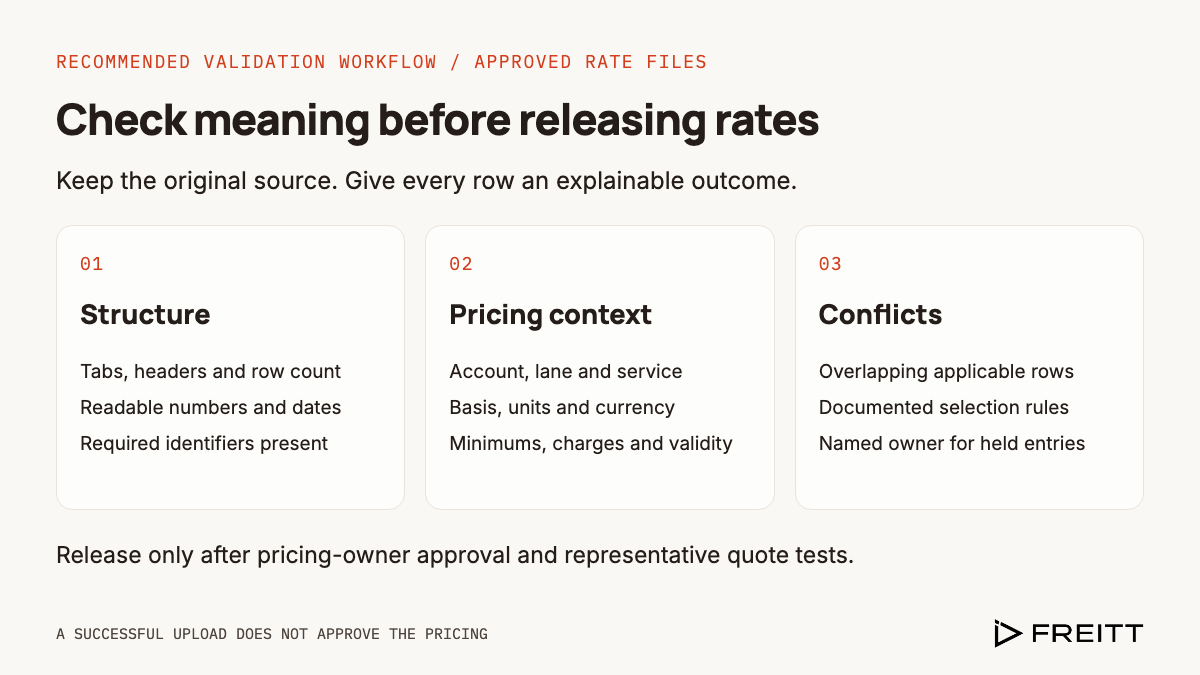
Validation should produce an explainable result for every source row. Separate basic file checks from pricing checks so an unreadable value does not disappear inside a general "upload failed" message.
Step 1: Check Structure and Required Values
Confirm the expected tabs, headers and row counts. Flag missing identifiers, invalid dates, unrecognized currencies and numbers that cannot be read reliably. Check hidden rows and formula cells deliberately instead of assuming the visible worksheet is the whole source.
When a workbook uses formulas, verify the values your import actually reads. A formula that displays correctly in someone's spreadsheet application may not produce the expected result in another processing path.
Step 2: Check Applicability and Calculation Rules
Verify that the customer, lane, service, class and weight band are sufficient to select the intended entry. Check effective dates, minimums, fuel bases and charge triggers against the approved source.
Test boundaries explicitly. A shipment exactly at a weight break should match the intended band, and a shipment outside the authorized scope should not inherit a nearby lane's price. Your agreement determines how boundaries work.
Step 3: Identify Conflicting Matches
Define a selection key using the fields that distinguish your rates. Two rows with the same lane may be valid for different customers or dates; they are not automatically duplicates.
Hold entries when two applicable rows could produce different prices for the same request without an approved priority rule. Record both source references and let the pricing owner resolve the conflict. Do not silently choose the cheaper row or the last row read.
Note: A structural pass means the data can be read. It does not establish that the pricing terms are correct or approved for quoting.
Worked Example: Reconcile a 5,000-Row Import
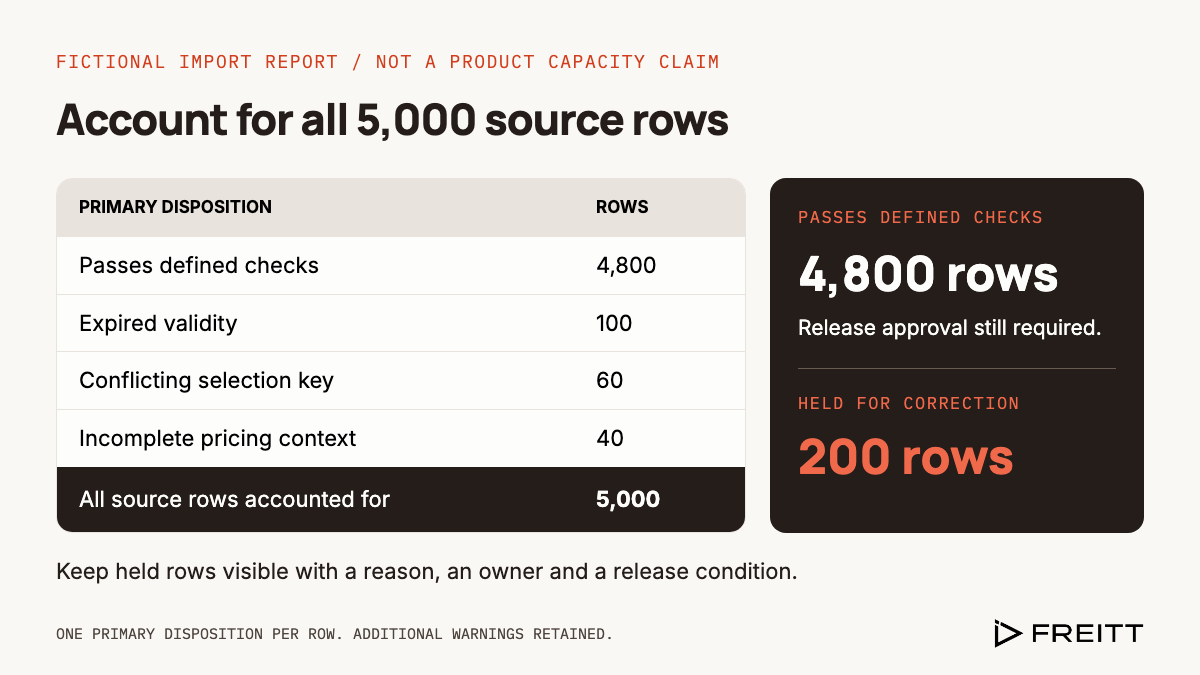
Example: Your desk validates an approved workbook containing 5,000 candidate rate rows. The counts below are fictional planning data, not customer results or a statement about software import capacity.
Assign one primary disposition to each row so the summary reconciles. Keep additional warnings in the detailed record without counting the same row repeatedly.
Primary disposition | Rows | Next action |
|---|
Passes defined checks | 4,800 | Hold for release approval and quote testing |
Expired validity | 100 | Obtain an authorized current source |
Conflicting selection key | 60 | Resolve overlapping applicable entries |
Incomplete pricing context | 40 | Confirm missing basis, units or currency |
Total | 5,000 | Every source row accounted for |
The arithmetic is 4,800 + 100 + 60 + 40 = 5,000. The 200 held rows remain visible with reasons and owners. They do not become zero-priced options or disappear from the record.
For example, row 118 may have an expired end date, while row 706 conflicts with another valid entry for the same account, lane and weight band. The detailed report should identify the workbook tab, source row, observed problem and evidence required to clear it.
Ask the pricing owner whether unaffected rows can be released separately. If the errors suggest a shared mapping problem, hold the whole candidate version until you understand the scope.
Tip: Re-run the relevant checks after a correction, then reconcile the counts again. A smaller error list is not proof that the intended rows were fixed.
Prove a Complete LTL Calculation with a Test Shipment
Use a known test request to check how the mapped fields work together. A correct-looking individual rate can still produce the wrong total if the minimum or fuel basis was lost.
Example: Assume a fictional approved rate applies to the test shipment's account, lane, class and weight band. It specifies a charge of USD 5.80 per hundredweight, a USD 180 linehaul minimum, fuel at 20% of the minimum-adjusted linehaul and a USD 75 liftgate charge.
The shipment weighs 2,500 pounds. DAT's LTL rate guidance defines CWT as 100 pounds and distinguishes modeled market estimates from tariff data. Here you are testing an explicitly assumed agreement, not using a market estimate as an approved rate.
The expected calculation is:
Rated quantity: 2,500 ÷ 100 = 25 CWT.
Calculated linehaul: 25 × USD 5.80 = USD 145.
Apply the stated minimum: linehaul becomes USD 180.
Fuel: 20% × USD 180 = USD 36.
Total: USD 180 + USD 36 + USD 75 = USD 291.
This simplified example has no discount, tax or other charge. Your applicable terms may use different rules, calculation order, rounding or charge bases. Confirm those terms rather than copying this example into production pricing.
If a test request needs measurement checks, the free LTL Density Calculator and Linear Feet Calculator can help check density and estimated floor space. Their estimates do not confirm final classification or carrier loading and rating rules.
Release an Approved Version and Keep a Withdrawal Plan
Release only after the responsible owner has reviewed the validation result and representative quote tests. Record which rows or file version are approved, the activation time and any outstanding exclusions.
Keep previous versions for traceability, but prevent an obsolete release from competing with the active source. If two versions overlap, document how the desk determines which applies. Do not assume the newest upload automatically overrides every earlier agreement.
Before release, confirm:
Source rows reconcile to approved or held outcomes.
Test quotes match independently checked calculations.
Held entries have reasons, owners and release conditions.
Reviewers can identify the rate version behind a draft.
Someone can withdraw a faulty version and identify affected drafts.
After activation, sample early drafts against their sources. If you find a material issue, stop using the affected version, identify drafts that relied on it and assign review before sending. Evaluate already-sent offers through your commercial correction process.
Plan the withdrawal method before you need it. This may require a documented manual procedure or controls in your chosen systems; do not assume an automatic rollback or bulk-reprocessing feature exists.
Note: File size and row count are workload inputs. Test the proposed setup with representative files before making capacity or turnaround commitments.
FAQs
What is LTL rate sheet automation?
LTL rate sheet automation converts approved spreadsheet pricing into structured records that support consistent quote preparation. Useful records retain the applicable account, lane, rate basis, charges, validity and source reference. Validation and approval still matter: an uploaded price is not ready for customer quoting until its meaning and calculation rules have been checked.
Which fields should you validate in a carrier rate import?
Validate the fields needed to select and calculate the applicable rate. These commonly include account, origin, destination, service, class, weight band, charge basis, currency, minimums, additional charges and validity dates. Keep workbook, tab and row references. The exact requirements depend on the approved agreement and the services your desk quotes.
Should you reject an entire file when some rows fail?
Hold the entire candidate version when the errors suggest a shared mapping or pricing problem. If the issues are isolated, the pricing owner may approve unaffected rows under a controlled process. Either way, account for every source row and keep failed entries unavailable for quoting until their release conditions are met.
How should you handle duplicate or overlapping LTL rates?
Check whether the entries apply to the same request before calling them duplicates. Different accounts, services, dates or weight bands can justify similar-looking rows. When two entries remain applicable and no authorized priority rule resolves them, hold the conflict for the pricing owner instead of silently selecting one price.
Can you treat a blank rate or surcharge as zero?
Treat a blank as unresolved until the source owner confirms its meaning. It may indicate missing information, an included charge, a waived service or an unavailable option. An explicit zero and an empty cell are different data states. Preserve that distinction during mapping so incomplete pricing does not become an apparently complete offer.
How do you check whether an imported rate calculates correctly?
Run representative test shipments against independently checked expected totals. Include minimum charges, weight-break boundaries, fuel bases, accessorial triggers and expired or missing sources. Retain the source row and calculation steps for each test. A successful lookup proves that a record was found; it does not prove that every charge was applied correctly.
Prepare Rate Files Your Quote Desk Can Trust
Start with one approved workbook, a clear mapping record and a validation report that accounts for every row. Prove the calculations before releasing the rates, and keep held entries visible until someone resolves them.
To discuss using your approved rate sheets to prepare human-reviewed quote drafts with Freitt,