A freight rate sheet template is an internal structure for storing the rates, charges and conditions your team uses to price shipments. A useful sheet tells you which rate applies, how to calculate it and whether you can still use it.
The trouble starts when a workbook holds the price but leaves its meaning in someone's memory. A number without a currency, minimum or validity date is not ready for quoting, even if the spreadsheet looks tidy.
This guide gives you a copyable rate-book structure, a worked minimum-charge calculation and a review process for new carrier files. You can use it to organize existing agreements without turning a carrier's missing information into an assumed price.
Key Takeaways
Store the rate basis, currency, validity and source beside every price.
Keep base rates, surcharges and conditional services separately identifiable.
Treat a missing value as a question to resolve, not a zero-cost service.
Check minimum charges and surcharge bases before trusting a calculated total.
Approve new versions against their source and retain the history behind previous quotes.
What Is a Freight Rate Sheet?
A freight rate sheet records the prices and conditions available for defined transport services. It may contain carrier buy rates, customer sell rates or both, but you should label those roles clearly and control who can access each one.
Your internal rate book, customer quotation and carrier rate confirmation serve different purposes:
Document | Main purpose | What changes between records |
|---|
Internal rate sheet | Store approved pricing inputs and conditions | Carrier, route, service, basis and validity |
Customer quote | Offer a price for a defined shipment | Cargo, scope, timing, sell price and acceptance conditions |
Carrier rate confirmation | Record the agreed arrangement for a particular load | Load reference, stops, equipment and agreed charges |
Do not use a customer quote total as a replacement for the underlying buy rates. You would lose the conditions and charge details needed to price the next request correctly.
Copy This Freight Rate Sheet Template Structure
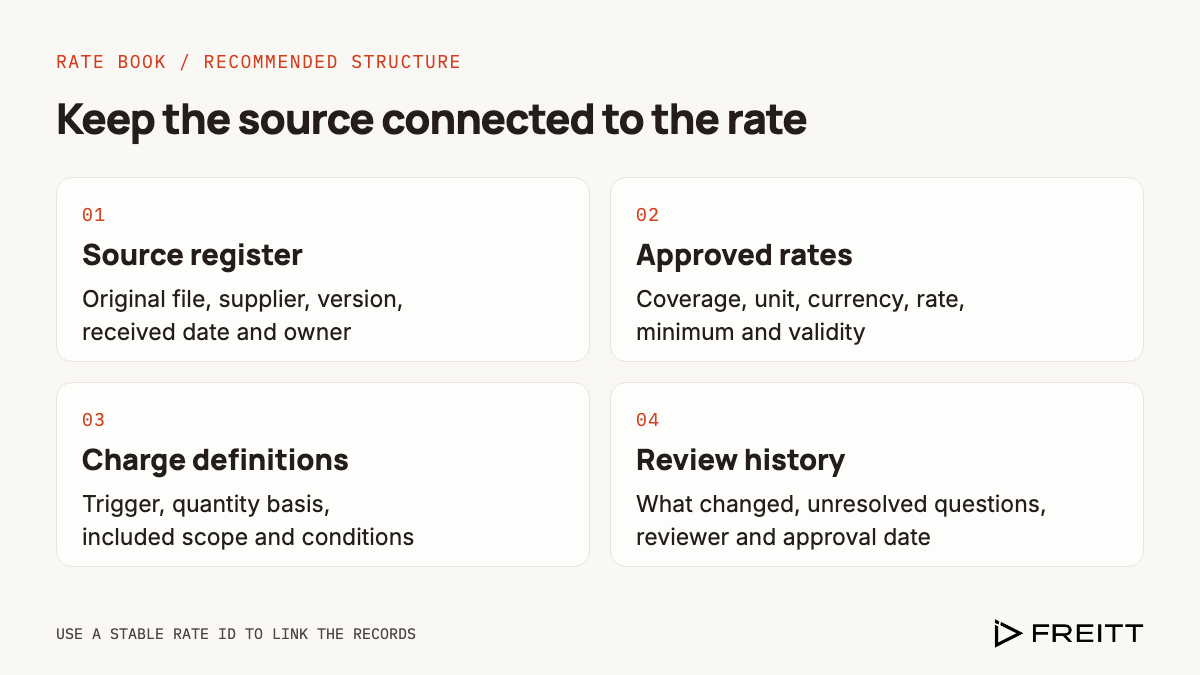
Use a small set of connected tabs rather than one sheet that mixes source files, calculations and customer offers. Give every approved rate a stable reference so a colleague can find its evidence later.
Source Register
Record the original filename or email reference, supplier, received date, version, owner and approval status. Preserve the original attachment, including notes or terms that sit outside its price table.
Approved Rates
Copy these fields into your main rate table:
Field group | Columns to include |
|---|
Identity | Rate ID, supplier, source reference and source row or page |
Coverage | Origin, destination, direction, mode, service and equipment |
Applicability | Commodity restrictions, weight or volume band and other conditions |
Price | Charge code, currency, unit, rate, minimum and maximum if stated |
Dates | Valid from, valid to and the event those dates apply to |
Control | Approval status, reviewer, reviewed date and version |
For a workbook you design yourself, one row per charge and applicability combination makes separate currencies, dates and minimums easier to maintain. A carrier's original wide layout can still remain unchanged in the source archive.
Charges and Review History
Keep the definition of each additional charge, its trigger and its calculation basis. A percentage needs a named amount to apply to, while a fixed service charge needs the unit it covers.
Use the review-history tab to record what changed, why it changed and who approved it. Record unresolved questions there too, with a named owner and a link back to the affected rate.
Tip: “Not quoted,” “not applicable” and “included in base rate” mean different things. Use explicit status fields so an empty cell cannot quietly stand in for all three.
How Do You Build a Reliable Rate Sheet?
Build a reliable rate sheet by defining the record structure first, loading a small sample and checking it against the original agreement. Expand the file only after another person can reproduce your calculations.
Step 1: Define the Service You Are Recording
Start with one mode and one service scope. State whether a rate covers a port pair, an airport pair, a postcode zone, a named road lane or another agreed service.
Use consistent location identifiers where they help your team. Keep the original carrier wording beside any normalized description so a broad location label cannot silently expand the rate's coverage.
Further reading: The road freight quoting workflow shows why equipment and lane, zone or distance rules must remain connected to the applicable sheet.
Step 2: Make Units and Currency Mandatory
Enter rates as numeric values and keep currency and unit in separate fields. For example, “1.40” needs “USD per kilometer” and the distance basis used by that supplier before it becomes usable pricing data.
Keep each currency visible until you apply an approved conversion method. Adding USD and CAD figures together does not produce a meaningful total, even when both columns display a dollar sign.
Step 3: Capture Minimums and Surcharge Rules
Record the minimum for the specific charge it governs. Do not assume a minimum applies to the whole shipment when the carrier states that it applies only to main freight.
Fuel needs its own rule and effective date. The U.S. Energy Information Administration's surcharge guidance explains that EIA publishes diesel prices but does not calculate, assess or regulate fuel surcharges. Your supplier's method determines the surcharge, not the index value alone.
Step 4: Add Validity and Approval Gates
Store real date values, including a start date and end date when the agreement supplies them. Record whether validity follows booking, pickup, departure or another specified event.
Keep a rate on hold when its date basis is unclear. A file received today is not necessarily effective today, and an unexpired price may still exclude the shipment date you need.
Freitt's rate-sheet automation workflow maps existing Excel layouts, remembers mappings and excludes expired rate lines from selection. It flags a missing valid rate and drafts a carrier inquiry rather than inventing a price.
Step 5: Test a Small Set Before Approval
Choose examples that exercise the rules: a normal shipment, one below the minimum, an expired rate and a requested service with no price. Check the result against the source manually.
Test boundaries too. If a weight band ends where the next one begins, record which band includes that boundary and how rounding works. Ask the supplier when the source does not settle the question.
Worked Example: Apply the Minimum Before Fuel
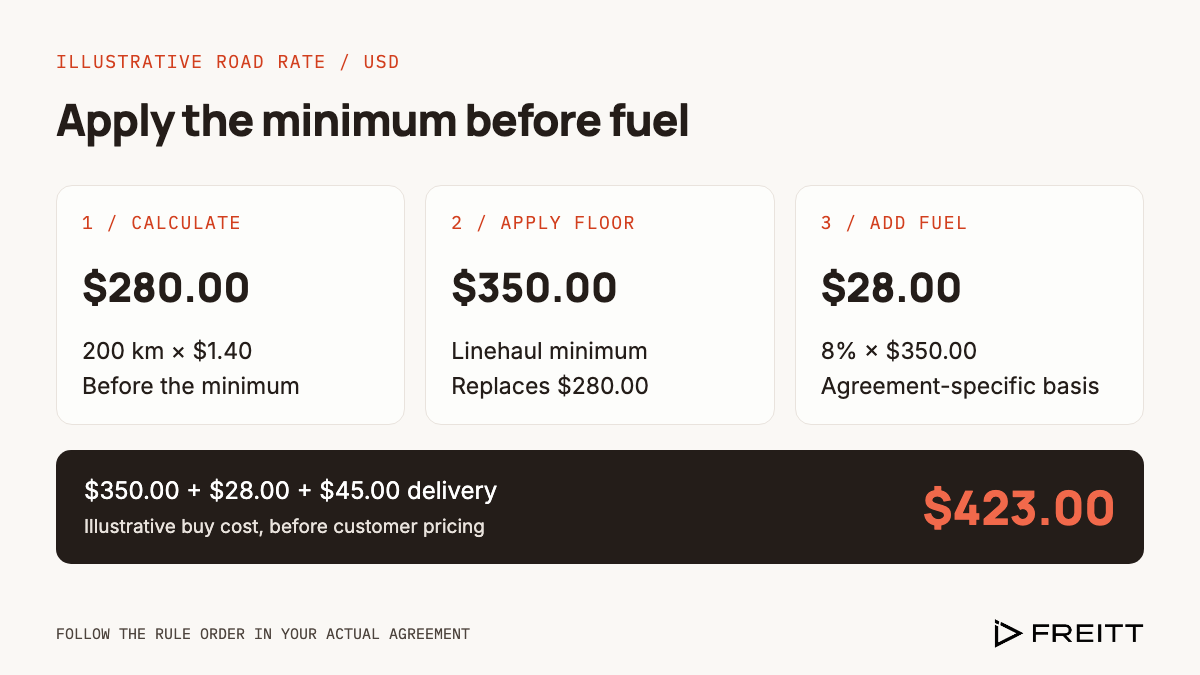
Example: A road carrier agreement charges by distance, applies a minimum to linehaul, then calculates fuel on the resulting linehaul amount. It also lists a fixed delivery service charge. These inputs are illustrative, not live carrier rates or recommended commercial terms.
Input | Example value | Meaning |
|---|
Rated distance | 200 km | Distance accepted under this example agreement |
Linehaul rate | USD 1.40 per km | Price before the linehaul minimum |
Linehaul minimum | USD 350.00 | Floor for the linehaul charge only |
Fuel | 8% of rated linehaul | Applied after the minimum in this example |
Delivery service | USD 45.00 | Separately confirmed fixed charge |
Calculated linehaul is 200 × 1.40 = USD 280.00. Because this is below the USD 350.00 minimum, the rated linehaul becomes USD 350.00.
Fuel is USD 350.00 × 8% = USD 28.00. Add the confirmed delivery charge, and the total buy cost is USD 350.00 + USD 28.00 + USD 45.00 = USD 423.00.
Put the Working Into Spreadsheet Cells
For this example calculation, use B2 for distance, C2 for the rate, D2 for the minimum, F2 for fuel as a percentage and H2 for the fixed delivery charge. Then use:
E2, rated linehaul: =MAX(B2*C2,D2)
G2, fuel amount: =E2*F2
I2, total buy cost: =SUM(E2,G2,H2)
These formulas assume the inputs have already passed your completeness and validity checks. They do not establish whether a charge applies or whether an absent minimum means zero.
Note: Enter 8% as a percentage, not the whole number 8. Confirm the supplier's fuel basis before reusing this calculation on another sheet.
Check the Result Without the Minimum
If you mistakenly use USD 280.00 as linehaul, fuel becomes USD 22.40 and the total becomes USD 347.40. That understates the example buy cost by USD 75.60 before you apply any customer pricing rule.
Adapt the Fields to Air, Ocean and Road Rates
Keep common control fields across modes, then add the fields needed to interpret each rating basis. A familiar workbook structure should not force every service through the same formula.
Mode or service | Additional fields | Review question |
|---|
Air | Weight breaks, chargeable-weight basis, rounding and minimum | Which weight and break does this rate use? |
Ocean FCL | Container size and type, quantity and charge unit | Is this charge per container or per shipment? |
Ocean LCL | W/M basis, minimum and local charge scope | Which weight or volume rule controls this line? |
Road FTL | Equipment, route basis, distance source and extra stops | Does this agreement cover this movement? |
Road LTL | Commodity, NMFC item, class and shipment characteristics | Does the applicable classification match the cargo? |
For LTL, do not turn density into a universal class lookup. NMFTA's freight class explanation identifies density, handling, stowability and liability as classification characteristics. Keep the applicable item and classification evidence with your rating inputs.
For international services, check the endpoints of every included leg. “Origin charges included” still needs a defined collection or terminal scope, while destination handling and inland delivery may have separate terms.
Keep New Versions From Breaking Your Rate Book
Review changes before making a new version available for quoting. Preserve the earlier version so you can explain past offers without reconstructing deleted rows.
Use this update checklist:
Source: Save the original file and identify its supplier and version.
Differences: Compare rates, validity, service scope, minimums and surcharge bases.
Exceptions: Hold ambiguous locations, missing units and unanswered questions.
Test: Recalculate representative examples, including a minimum and an expiry case.
Approval: Record the reviewer and when the new version becomes active.
History: Retain the superseded version and its connection to earlier quotes.
Avoid overwriting an active row halfway through reviewing a replacement. A colleague could quote from the changed rate before you notice that its surcharge or minimum has also moved.
Freitt keeps source-sheet and rate-line references against priced charges, which helps your team trace a draft back to the rate evidence. Your review process still needs to approve the source interpretation and resolve any gaps.
Further reading: The freight quote automation software guide explains how rate records fit into the wider RFQ-to-draft process.
FAQs
What Should a Freight Rate Sheet Include?
A freight rate sheet should include the supplier, service coverage, rate basis, currency, validity, applicable minimums, additional charges and source reference. Add approval and version fields so reviewers know which records are ready to use. Keep conditions alongside the relevant price rather than relying on a separate note that colleagues may never read.
Can You Build a Freight Rate Sheet in Excel?
You can build a freight rate sheet in Excel using structured tables, numeric rate fields, date values and controlled choices for units and status. Start with a small, reviewed set of agreements before expanding it. Protect calculation cells and keep source attachments accessible so a tidy spreadsheet does not become detached from the original terms.
Is a Rate Sheet the Same as a Freight Quote?
A rate sheet stores pricing inputs for a defined range of services, while a freight quote offers a price for a specific shipment. The quote uses the applicable rates, cargo details, service scope and customer pricing rules. Keep the internal buy-rate record separate from the customer version so sensitive costs do not appear in the offer.
How Often Should You Update Carrier Rate Sheets?
Update a carrier rate sheet whenever the supplier issues revised rates or conditions, and review upcoming expiry dates as part of your regular desk routine. There is no single interval that makes every agreement current. Assign an owner to renewal requests and keep unconfirmed replacements out of the approved rate book until review is complete.
How Do You Handle Missing Charges on a Rate Sheet?
Treat a missing charge as an unresolved pricing question until you confirm whether it applies and what it costs. Do not enter zero merely to make a formula return a total. Record the affected service, ask the supplier for clarification and keep the quote from appearing complete while a required cost remains unknown.
Can Software Use Your Existing Freight Rate Sheet?
Software can use an existing freight rate sheet when its layout and pricing rules are mapped and checked correctly. Test dates, units, minimums and exceptions before trusting the output. Freitt maps existing Excel layouts during setup and prepares quote drafts from your rates, while your team reviews and sends the customer response.
Test Your Rate Book on One Real RFQ
Start with one current carrier sheet and a shipment your team has already priced. Use the template structure to trace the source, reproduce the calculation and identify anything the workbook leaves unclear.
Book a Demo with that RFQ and rate sheet to see how the approved inputs become a draft for your team's review.