The best LTL quoting software depends on what your desk needs to produce. Buying transport for your own freight, running a brokerage and preparing customer offers from approved rates are different jobs, even when every demo shows a quote screen.
Start with the rate source, the person receiving the quote and the work that happens after approval. Then test a shortlist against your actual lanes, accessorial requirements and pricing rules.
This guide compares four options by workflow, explains their published pricing basis and gives you a reusable demo scorecard. You'll also get a worked evaluation example that shows why a high score should not override a missing requirement.
Key Takeaways
Choose software for your buyer role and quoting workflow before comparing feature lists.
Confirm whether rates come from your carrier accounts, a provider's program or approved files you supply.
Test accessorials, incomplete requests and revised shipment details with real examples.
Compare pricing units carefully because quotes, shipments, users and locations are different limits.
Treat mandatory requirements as pass-or-fail gates before using a weighted score.
What Does LTL Quoting Software Need to Do for Your Desk?
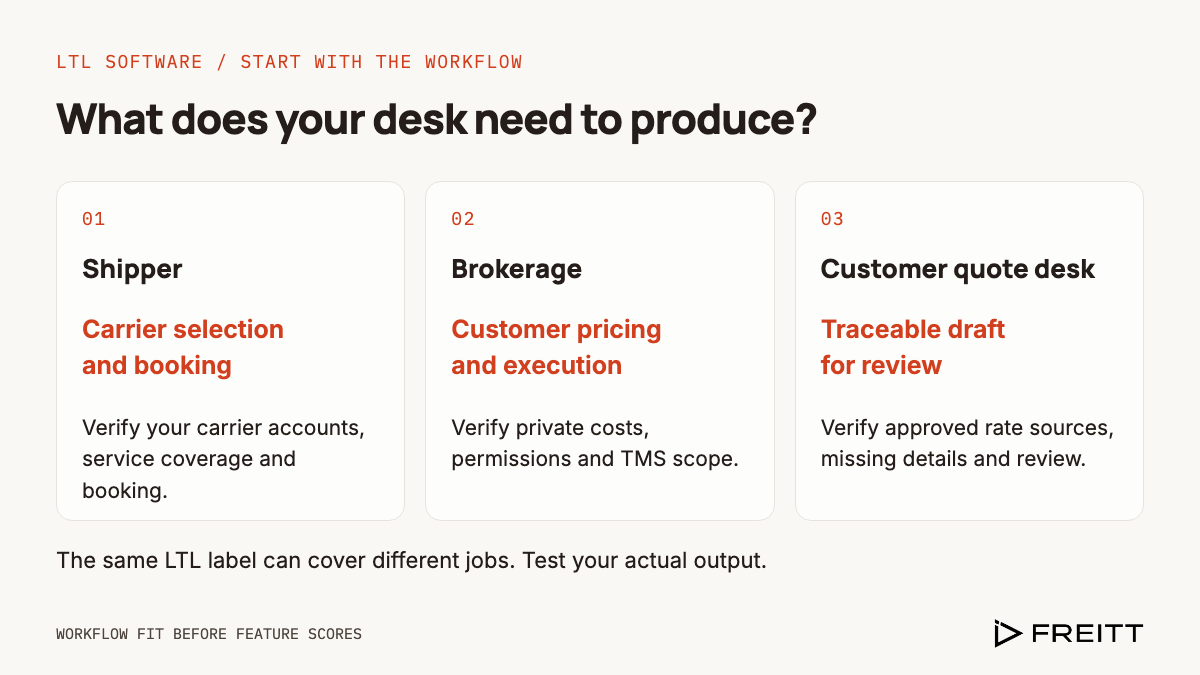
LTL quoting software needs to support the decision and output your team owns. A shipper may need a carrier selection and booking, while a broker or forwarding desk may need a customer sell quote, review controls and a handover to execution.
Define the workflow before asking if a tool has “LTL.” That label alone does not establish your rate access, commercial responsibilities or integration requirements.
Your desk's main job | Essential output | What to verify first |
|---|
Ship your own goods | Comparable carrier offers and an accepted shipment | Carrier accounts, service coverage and booking workflow |
Operate a brokerage | Customer pricing connected to shipment execution | Buy and sell separation, customer permissions and TMS scope |
Prepare customer quotes from approved rates | Traceable draft for a person to review and send | Source records, missing-data handling and pricing rules |
For US and Canada work, test the actual origins, destinations, currency labels and service requirements you use. Confirm carrier and cross-border coverage in your configuration.
Tip: Write one sentence describing the output you need. “Compare our carrier offers and book” produces a different shortlist from “turn emailed RFQs into customer drafts.”
Which LTL Quoting Tools Should You Shortlist?
Shortlist tools whose published scope matches your work, then verify the details in a demo. The options below are grouped by workflow, not ranked by independently measured performance.
This is a vendor-published capability comparison, not a hands-on benchmark. Product and pricing pages were checked on November 18, 2026. Freitt publishes this guide, so treat its inclusion as an option to evaluate using the same requirements as the others.
1. Freitt: Customer Drafts from Your Approved Rate Sources
The road-freight workflow prepares a traceable draft from applicable lane, zone or distance rates, with sheet-defined fuel and accessorials. It fits a small forwarding or road-freight quote desk using approved rate sources alongside existing systems. A person reviews and sends the quote.
Current pricing lists Starter at $55 per user monthly and Growth at $89 per user monthly. Growth adds configured margin rules and approval routing. Confirm the plan needed for your workflow; the product is not a universal live-rate feed or a replacement for carrier booking and dispatch.
Bring a representative rate file and an incomplete RFQ. Test whether your source format, charge definitions and review process work before treating the fit as established.
2. Freightview: Carrier Comparison and Shipping Management
Freightview's product overview describes quoting, booking and analyzing LTL, truckload and parcel shipments. Consider it when your main task is managing transport purchases and execution, rather than only preparing an outbound customer offer.
Its published pricing lists $149 per month for up to 50 shipments monthly, with larger volume bands requiring a call. The page also advertises a 14-day trial. Confirm currency and your applicable tier.
Ask the vendor to demonstrate your carrier accounts, an accessorial-heavy LTL move and the output your customer or receiving team actually needs. Do not assume a shipping workflow automatically supplies every brokerage or forwarding requirement.
3. OnKue by Kuebix: A Shipper TMS with Defined Usage Limits
FreightWise's OnKue page positions the product for small shippers. It describes rate requests, booking, tracking and shipping-document creation for LTL, parcel and truckload work, with access to a preferred-carrier program alongside existing carriers.
The entry offer displays $69 per month for one user, one location and up to 100 quotes monthly. The same page describes larger tiers and distinguishes the fuller Kuebix offering from OnKue for broader connectivity needs.
Check how a quote is counted, which carrier connections are included and what integration would require another license. Do not treat a quote allowance as a shipment allowance, or assume every feature on the page belongs to the entry tier.
4. Quote Factory: Brokerage TMS Scope
Quote Factory's pricing page lists LTL carrier rates, a customer portal, unlimited users, load-board posting and QuickBooks integration among plan inclusions. Consider it when customer quoting needs to sit within a broader brokerage system.
Published plans show $499 monthly for up to 150 shipments, $999 for 151 to 300 and sales contact above that. Ask how the relevant shipment count is defined and what your required external services cost, even when software features are included.
In the demo, follow one LTL request from carrier buy offer through customer pricing and execution. Verify the customer portal's permissions and whether your existing accounting and operating processes fit the proposed setup.
Which Capabilities Should You Test Beyond the Quote Screen?
Test rate provenance, shipment detail handling and the review process. A polished list of carrier prices does not establish that your team can explain or safely act on the result.
Rate Source and Scope
Ask where each rate comes from and whose commercial agreement applies. Record the account, source date and scope behind the price, including fuel and accessorial treatment.
If a rate is unavailable, the software should expose the gap in a way your team can handle. Establish what the workflow does next rather than accepting a substitute price without checking its basis.
Accessorials and Shipment Changes
Use a delivery that needs a liftgate, a carrier-defined limited-access service and an accepted appointment. Check whether the system distinguishes those requirements and preserves the correct endpoint.
Further reading: Use the LTL accessorial checklist to prepare the test inputs. It covers the receiving conditions that a software demo can otherwise leave unspecified.
Then change the delivery address or packed dimensions. Confirm whether the original offer is retained, the changed scope is visible and the new price requires the appropriate review.
Customer Pricing and Source Traceability
For a customer quote desk, check that private buy costs remain separate from the customer-facing offer. Ask how margin rules, exceptions and reviewer responsibilities work in the plan you are buying.
For file-based pricing, inspect the connection between the calculation and the approved record. The rate-sheet automation workflow is one example of keeping source and validity information with the quote. Evaluate the equivalent evidence you need in every shortlisted tool.
Note: Demonstrated capability and a feature promised for later are different procurement inputs. Record current availability in the written proposal.
How Do You Run a Useful LTL Software Demo?
Run the same representative requests through every shortlisted product. Give vendors the same instructions and record the resulting output, interventions and unresolved questions.
Step 1: Prepare a Small Test Pack
Include a straightforward shipment, an accessorial-heavy delivery, an incomplete request and a changed shipment. Use accurate packed measurements and an approved classification source where required.
Supply the carrier accounts or rate files needed for your workflow through the vendor's agreed process. Sample rates do not establish your account access.
Step 2: Set Mandatory Gates
Write down requirements that must pass before scoring begins. Examples include your required carrier coverage, private-cost permissions, a reproducible pricing source and review before a customer offer is sent.
Ask for evidence of each gate. If a required capability depends on configuration or integration, record the owner, work and acceptance test rather than marking it available by default.
Step 3: Observe the Whole Task
Start with the incoming request and continue to the output your desk actually owns. Record where someone rekeys data, resolves missing details, checks services or corrects a calculation.
Keep manual review when your business process requires it. Distinguish draft preparation from reviewed completion.
Step 4: Retest an Exception
Remove a required dimension or make the rate source unavailable. Then revise the destination's receiving requirements and inspect the result.
Your team should be able to identify the unresolved issue and determine who acts next. Check the proposed exception workflow.
Worked Example: Score the Demo Without Hiding a Failed Requirement
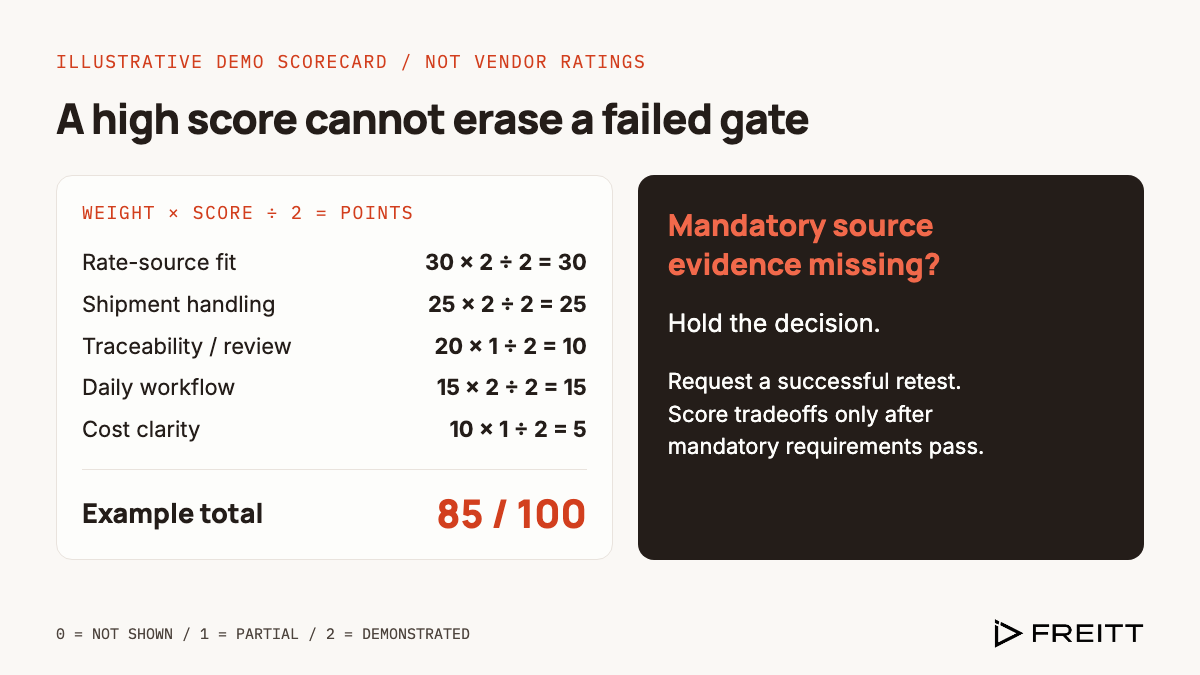
Example: A quote desk assigns the following weights before demonstrations. Scores run from zero to two: zero means not demonstrated, one means partial and two means demonstrated for the agreed test. These weights and results are hypothetical, not ratings of any named vendor.
Evaluation area | Weight | Example tool score | Weighted points |
|---|
Rate-source fit | 30 | 2 | 30 |
Shipment and accessorial handling | 25 | 2 | 25 |
Traceability and review evidence | 20 | 1 | 10 |
Fit with daily work | 15 | 2 | 15 |
Cost and implementation clarity | 10 | 1 | 5 |
Total | 100 | Not applicable | 85 |
Calculate each contribution as weight × score ÷ 2. The example totals 30 + 25 + 10 + 15 + 5 = 85 points out of 100.
Now suppose the desk requires every customer offer to retain a reproducible rate source, but the demo cannot supply it for an essential workflow. The tool remains on hold despite its score. Ask for a successful retest or remove it from consideration.
A weighted score helps compare tradeoffs after mandatory gates pass. It should never disguise a failed requirement inside an attractive average.
What Will the Software Actually Cost Your Team?
Compare the monthly bill for your actual workload, plus setup work and required services. Public entry prices alone do not make the products comparable.
Build a worksheet with these fields:
Required users and locations.
Monthly quote requests, revisions and booked shipments, counted separately.
Applicable tier, billing currency and commitment period.
Carrier connectivity, data or external subscriptions you need.
Configuration, integration, migration and training work.
Required approval, reporting and customer-access capabilities.
Data export, support scope and cancellation terms.
Example: A desk generates 180 requests but books 45 shipments in a month. A quote-based allowance and a shipment-based allowance may place that workload in different tiers. Add users and required features before comparing the resulting proposals.
Do not treat a vendor's published subscription as the freight charge itself. Verify transport pricing, carrier terms and software charges as separate parts of the buying decision.
FAQs
What is the best LTL quoting software for a small business?
The best option is the one that supports your actual shipping or customer-quoting workflow with the required rate access and controls. A small shipper may prioritize carrier comparison and booking, while a broker may need wider TMS functions. Test representative requests and mandatory requirements before using feature scores or entry prices to choose.
Can LTL quoting software use my negotiated carrier rates?
Some products support rates connected to your carrier accounts, while others also offer a provider's carrier program or work from files you supply. Verify your exact accounts, services and permissions during evaluation. Ask whose agreement governs each offer and whether the displayed price includes the required charges before assuming your negotiated rates are available.
Is LTL quoting software the same as a TMS?
LTL quoting can be one capability within a TMS, but the two descriptions do not establish identical scope. A TMS may cover booking and wider shipment execution, while a focused quoting tool prepares an offer for another process to handle. Define who owns each task and check the actual plan, integrations and handover.
How much does LTL quoting software cost?
Cost depends on the product's billing basis, your workload and the capabilities you need. Published offers may count users, locations, quotes or shipments, and some require a sales proposal. Compare the appropriate tier with required setup and external services. Confirm currency, term and counting rules rather than treating the lowest advertised figure as your final bill.
Will quoting software prevent every LTL billing adjustment?
Quoting software cannot guarantee that every later invoice will match an offer when shipment details, accepted services or actual events change. Test how it captures accessorial requirements and preserves evidence of the quoted scope. Your team still needs accurate inputs, applicable carrier terms and a process for reviewing changes and later billed items.
What should I bring to an LTL software demo?
Bring representative requests, approved rate sources or carrier-account requirements, accessorial details and your intended customer output. Include an incomplete request and a revised shipment so you can observe exception handling. Share a written list of mandatory requirements and apply the same test pack across vendors, recording what was demonstrated and what remains unverified.
Test One Real Request Before You Choose
Choose the workflow first, then verify the rate source, service scope, review controls and full cost. A useful shortlist should make the next test clearer, not replace it with an unsupported ranking.
Bring one LTL RFQ and its approved rate sheet to see whether Freitt fits your customer-quote process. Book a Demo.